Access a cluster with kubectl
This guide sets up kubectl on your workstation to talk to an Entigo cluster,
using the kubeconfig you download from the portal.
Access is authenticated with OIDC rather than a static token or certificate: the
kubeconfig delegates login to the kubelogin
plugin, so the first kubectl call opens the Entigo Platform login in a browser and caches the
resulting token. Later commands reuse it until it expires, then prompt again — you
never copy a credential into the kubeconfig by hand, and the file itself contains
no secret.
The steps below install the plugin, download the kubeconfig, point kubectl at
it, and sign in.
Prerequisites
kubectl— install per OS.kubelogin(int128) — the OIDC plugin, see step 1.- Network access to the cluster API endpoint. If the endpoint is private, connect the portal VPN first (Infrastructure → cluster → VPN tab).
1. Install the kubelogin plugin
The kubeconfig invokes it as kubectl oidc-login, so it must be on PATH as
kubectl-oidc_login. Any of:
kubectl krew install oidc-login            # any OS, via krew
brew install int128/kubelogin/kubelogin    # macOS / Linux
choco install kubelogin                    # Windows
Manual binaries / details: int128/kubelogin README.
If installed via krew, add krew's bin dir to PATH (krew setup), then verify:
export PATH="${KREW_ROOT:-$HOME/.krew}/bin:$PATH"
kubectl oidc-login --version
2. Download the kubeconfig
Infrastructure → open the cluster → ⋮ (top right) → kubeconfig. The downloaded file is ready to use as-is — no editing.
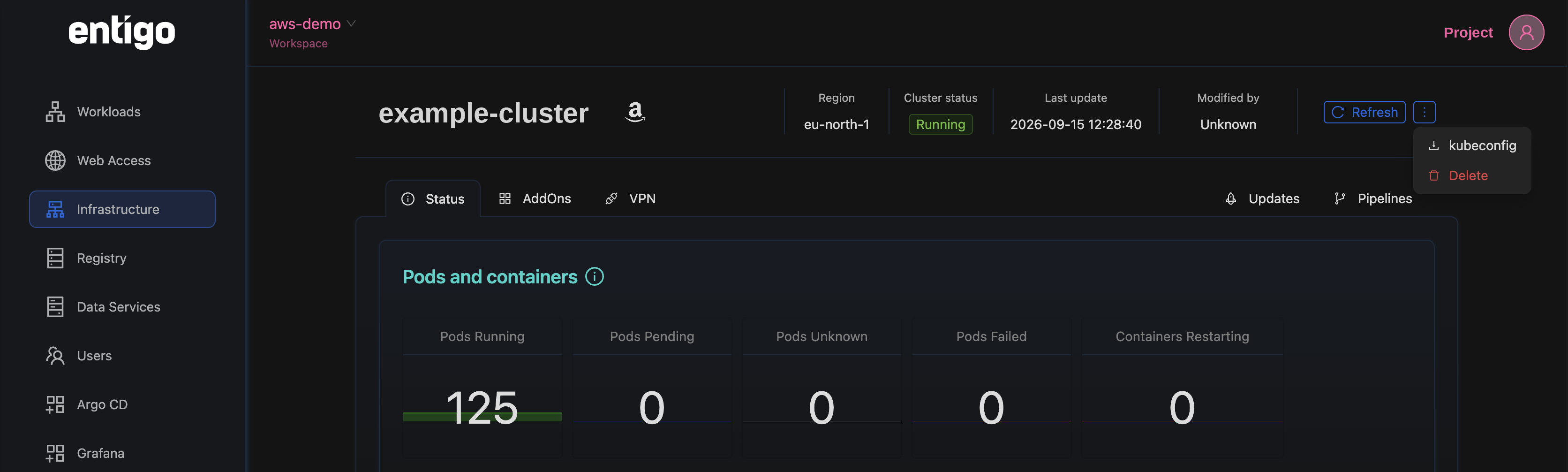
3. Point kubectl at the file
Set it for the current shell:
export KUBECONFIG=~/Downloads/kubeconfig.yaml # POSIX
$env:KUBECONFIG = "$HOME\Downloads\kubeconfig.yaml" # Windows PowerShell
Or merge it into your default config (kubeconfig docs):
KUBECONFIG=~/.kube/config:~/Downloads/kubeconfig.yaml \
  kubectl config view --flatten > ~/.kube/config.new
mv ~/.kube/config.new ~/.kube/config   # back up first
4. Authenticate
The first API call opens the Entigo Platform login in a browser and caches the token:
kubectl get ns
# browser opens -> log in -> command returns
Later commands reuse the cached token until it expires, then re-prompt automatically.
5. Verify
kubectl config current-context
kubectl get nodes
Troubleshooting
| Symptom | Cause / fix |
|---|---|
unknown command "oidc-login" / oidc-login: not found, but kubectl krew list shows it | krew's bin dir not on PATH. Add export PATH="${KREW_ROOT:-$HOME/.krew}/bin:$PATH" to your shell rc and restart the shell. |
Skipping plugin "oidc-login", it is already installed | Already installed — it's the PATH issue above, not the install. |
| Login opens but auth misbehaves | Wrong kubelogin (the Azure tool from Homebrew core brew install kubelogin). Reinstall via krew or the int128 tap. |
connection refused / timeout to the API endpoint | Endpoint unreachable. Public cluster → check egress/firewall; private cluster → connect the portal VPN. |
x509: certificate signed by unknown authority | kubeconfig edited/corrupted — re-download; the CA is embedded, don't strip it. |
| Browser doesn't open (headless/SSH) | Add --grant-type=authcode-keyboard to the user exec args, or run kubectl oidc-login get-token ... and follow the printed URL. |
| Stale/expired session | kubectl oidc-login clean, then re-run any kubectl command. |