Create a PostgreSQL Instance
This is an example of how to create a PostgreSQLInstance, PostgreSQLUser and PostgreSQLDatabase.
1. Create Kubernetes manifests and deploy them to the cluster
Create manifests for the PostgreSQLInstance, PostgreSQLUser and PostgreSQLDatabase and deploy them to the cluster.
It is a good practice to include them in the application's Helm chart.
1.1 Create a PostgreSQLInstance manifest
Security group and security group rules to access the PostgreSQLInstance from pods are created automatically.
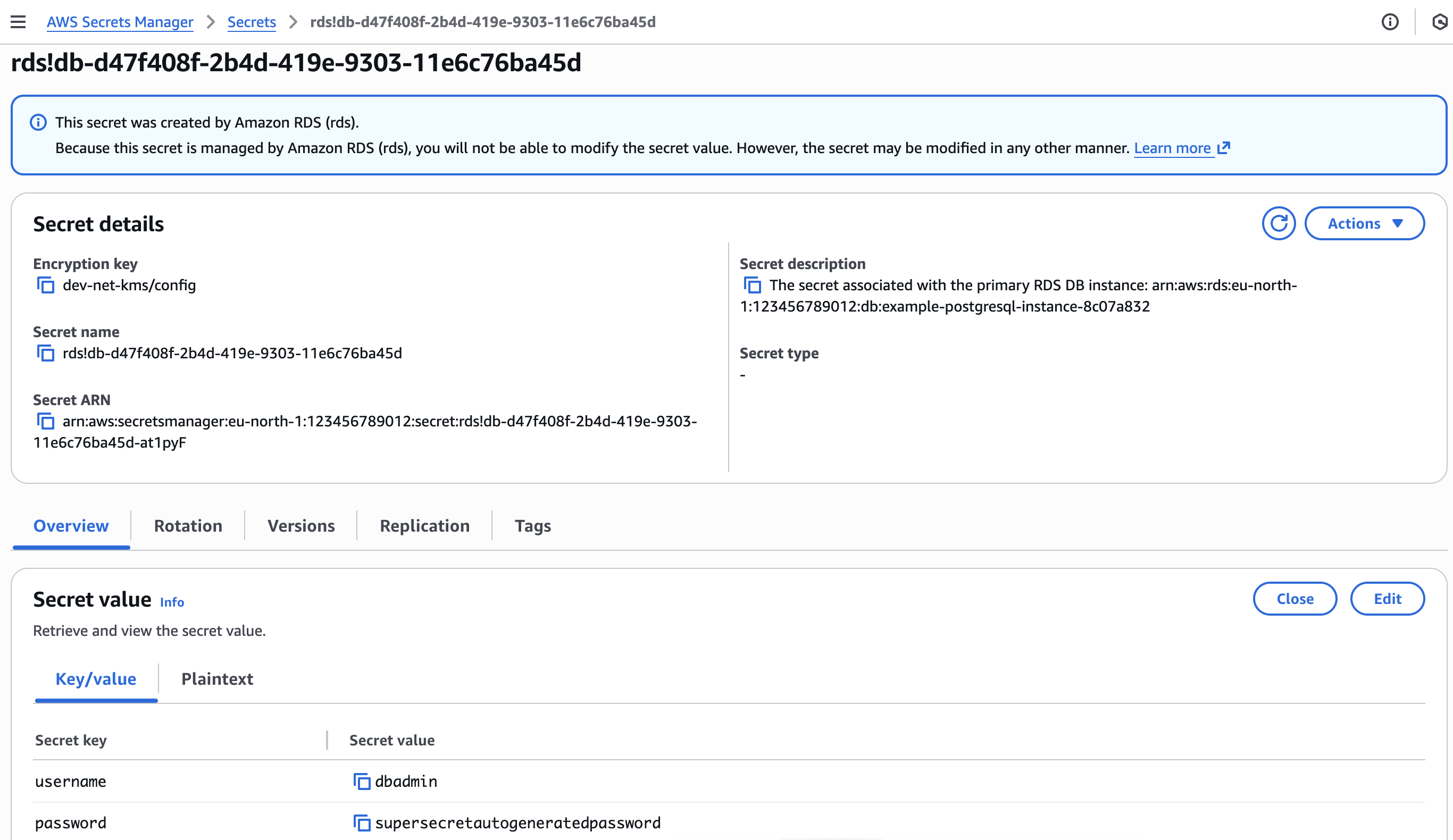
Connection credentials for the master user dbadmin are stored in a Kubernetes secret <.metadata.name>-dbadmin and AWS Secrets Manager secret.
# Example PostgreSQLInstance
apiVersion: database.entigo.com/v1alpha1
kind: PostgreSQLInstance
metadata:
  name: example-postgresql
spec:
  allocatedStorage: 20
  engineVersion: '17.10'
  instanceType: 'db.t3.small'

---
# Example PostgreSQLInstance with custom settings and parameter group
apiVersion: database.entigo.com/v1alpha1
kind: PostgreSQLInstance
metadata:
  name: example-postgresql
spec:
  allocatedStorage: 20
  engineVersion: '17.10'
  instanceType: 'db.t3.small'
  iops: 3000
  multiAZ: true
  parameterGroupName: 'default.postgres17'
  deletionProtection: true
  autoMinorVersionUpgrade: true
  allowMajorVersionUpgrade: false
  backupWindow: '03:00-05:00'
  maintenanceWindow: 'Mon:00:00-Mon:03:00'
---
# Example PostgreSQLInstance with custom parameters
apiVersion: database.entigo.com/v1alpha1
kind: PostgreSQLInstance
metadata:
  name: example-postgresql
spec:
  instanceType: 'db.t3.small'
  deletionProtection: false
  parameterGroupParameters:
    max_connections: '10'
    applyMethod: pending-reboot
Note: Creation of the PostgreSQLInstance can take more than 5 minutes.
Use kubectl watch to verify it is ready.
kubectl get pginstances.database.entigo.com example-postgresql -w
For all the options see https://docs.entigo.com/api/PostgreSQLInstance
1.2 Create PostgreSQLUser manifest
Creating a PostgreSQLUser is required if creating a PostgreSQLDatabase. Otherwise, it is optional.
Connection credentials for users created with PostgreSQLUser manifest are stored in a Kubernetes secret <.spec.instanceRef.name>-<.metadata.name>.
# Example PostgreSQLUser
apiVersion: database.entigo.com/v1alpha1
kind: PostgreSQLUser
metadata:
  name: example-user
spec:
  instanceRef:
    name: example-postgresql

---
# Example PostgreSQLUser with custom settings
apiVersion: database.entigo.com/v1alpha1
kind: PostgreSQLUser
metadata:
  name: example-owner
spec:
  instanceRef:
    name: example-postgresql
  login: false
For all the options see https://docs.entigo.com/api/PostgreSQLUser
Use kubectl watch to verify they are ready.
kubectl get postgresqlusers.database.entigo.com example-user  -w
kubectl get postgresqlusers.database.entigo.com example-owner -w
1.3 Create PostgreSQLDatabase manifest
Creating a PostgreSQLDatabase is optional.
# Example PostgreSQLDatabase
apiVersion: database.entigo.com/v1alpha1
kind: PostgreSQLDatabase
metadata:
  name: example-database
spec:
  owner: example-owner
  instanceRef:
    name: example-postgresql

---
# Example PostgreSQLDatabase with custom settings
apiVersion: database.entigo.com/v1alpha1
kind: PostgreSQLDatabase
metadata:
  name: example-database
spec:
  owner: example-owner
  instanceRef:
    name: example-postgresql
  extensions:
    - postgis
    - postgis_topology
  extensionConfig:
    postgis_topology:
      schema: topology
For all the options see https://docs.entigo.com/api/PostgreSQLDatabase
Use kubectl watch to verify they are ready.
kubectl get postgresqldatabases.database.entigo.com example-database -w
2. Mount connection credentials to a container
Connection credentials for the master user dbadmin are stored in a Kubernetes secret <.metadata.name>-dbadmin and AWS Secrets Manager secret.
Connection credentials for users created with PostgreSQLUser manifest are stored in a Kubernetes secret <.spec.instanceRef.name>-<.metadata.name>.
For more information about Secrets in Kubernetes, see Kubernetes documentation.
# Example
apiVersion: v1
kind: Pod
metadata:
  name: postgres
spec:
  terminationGracePeriodSeconds: 1
  containers:
    - name: postgres
      image: postgres:alpine
      command: ['sleep', 'infinity']
      env:
        - name: PGHOST
          valueFrom:
            secretKeyRef:
              name: example-postgresql-example-user
              key: endpoint
        - name: PGPORT
          valueFrom:
            secretKeyRef:
              name: example-postgresql-example-user
              key: port
        - name: PGUSER
          valueFrom:
            secretKeyRef:
              name: example-postgresql-example-user
              key: username
        - name: PGPASSWORD
          valueFrom:
            secretKeyRef:
              name: example-postgresql-example-user
              key: password
        - name: PGSSLMODE
          value: 'require'
3. Result
3.1 PostgreSQLInstance, PostgreSQLUser and PostgreSQLDatabase
PostgreSQLInstance, PostgreSQLUser and PostgreSQLDatabase created in Kubernetes
$ kubectl get pginstances.database.entigo.com
NAME                 SYNCED   READY   COMPOSITION                       AGE
example-postgresql   True     True    pginstances.database.entigo.com   19m
$ kubectl get postgresqlusers.database.entigo.com
NAME            SYNCED   READY   COMPOSITION                           AGE
example-owner   True     True    postgresqlusers.database.entigo.com   18m
example-user    True     True    postgresqlusers.database.entigo.com   18m
$ kubectl get postgresqldatabases.database.entigo.com
NAME               SYNCED   READY   COMPOSITION                               AGE
example-database   True     True    postgresqldatabases.database.entigo.com   17m
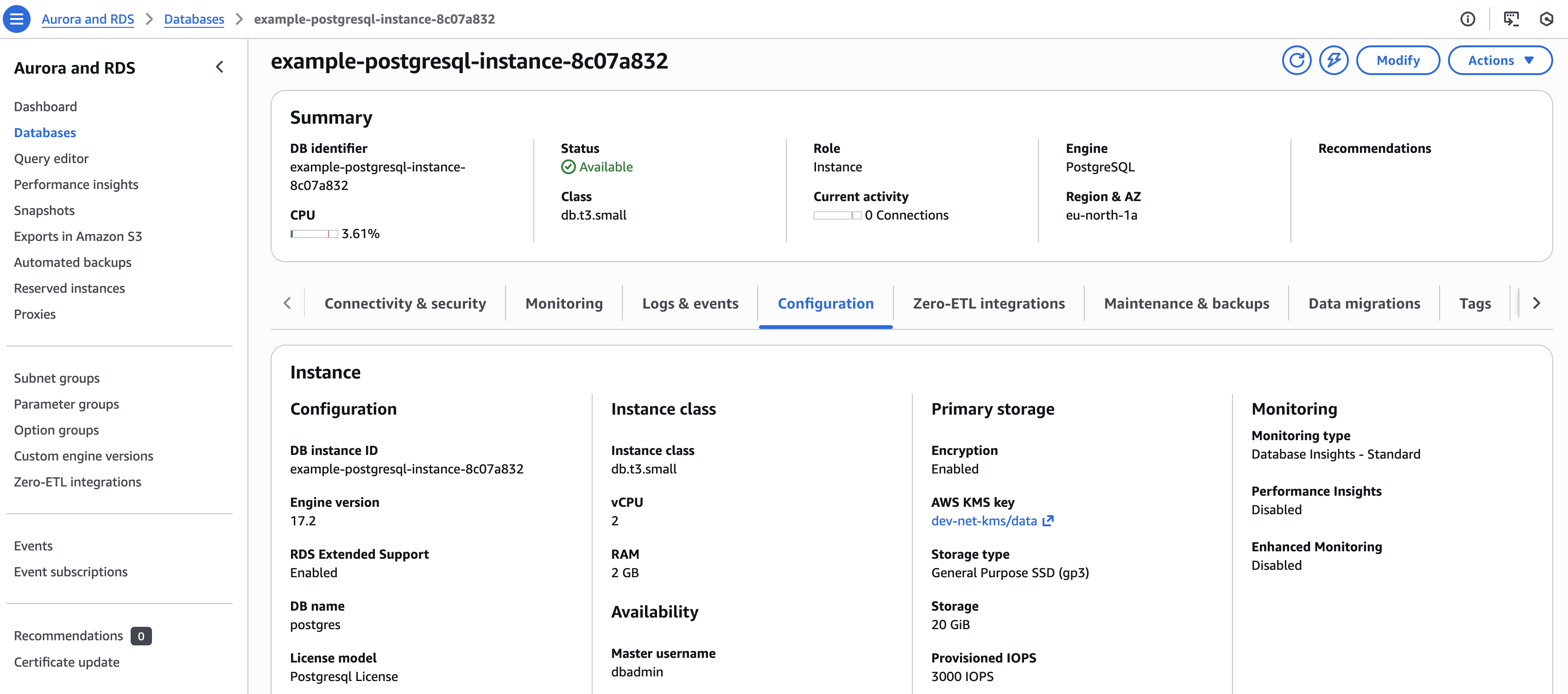
Amazon RDS PostgreSQL instance created in AWS Console
3.2 Secrets with connection credentials in Kubernetes and AWS Secrets Manager
Kubernetes secrets with connection credentials
$ kubectl get secret
NAME                               TYPE                                DATA   AGE
example-postgresql-dbadmin         Opaque                              4      14m
example-postgresql-example-owner   connection.crossplane.io/v1alpha1   4      14m
example-postgresql-example-user    connection.crossplane.io/v1alpha1   4      14m

$ kubectl get secret example-postgresql-dbadmin -o yaml
apiVersion: v1
kind: Secret
metadata:
  name: example-postgresql-dbadmin
  namespace: <namespace>
type: Opaque
data:
  endpoint: <base64-encoded-endpoint>
  port: <base64-encoded-port>
  username: <base64-encoded-username>
  password: <base64-encoded-password>

$ kubectl get secret example-postgresql-example-user -o yaml
apiVersion: v1
kind: Secret
metadata:
  name: example-postgresql-example-user
  namespace: <namespace>
type: Opaque
data:
  endpoint: <base64-encoded-endpoint>
  port: <base64-encoded-port>
  username: <base64-encoded-username>
  password: <base64-encoded-password>
AWS Secrets Manager secret with connection credentials for dbadmin user.
3.3 Secrets mounted to a container
Open a terminal in the pod and connect to the database using the mounted credentials.
$ kubectl get pod
NAME       READY   STATUS    RESTARTS   AGE
postgres   1/1     Running   0          24s

$ kubectl exec -it postgres -- bash
postgres:/# env | grep ^PG
PGPORT=5432
PGPASSWORD=...
PGSSLMODE=require
PGUSER=example-user
PGHOST=example-postgresql-instance-...rds.amazonaws.com

postgres:/# psql example-database
Verify the configuration is correct.
example-database=> \du
                                List of roles
    Role name    |                         Attributes
-----------------+------------------------------------------------------------
 dbadmin         | Create role, Create DB                                    +
                 | Password valid until infinity
 example-owner   | Cannot login
 example-user    |
...

example-database=> \l
                                                           List of databases
       Name       |     Owner     | Encoding | Locale Provider |   Collate   |    Ctype    | Locale | ICU Rules |   Access privileges
------------------+---------------+----------+-----------------+-------------+-------------+--------+-----------+-----------------------
 example-database | example-owner | UTF8     | libc            | en_US.UTF-8 | en_US.UTF-8 |        |           |
 postgres         | dbadmin       | UTF8     | libc            | en_US.UTF-8 | en_US.UTF-8 |        |           |
...

example-database=> \dx
                                              List of installed extensions
       Name       | Version | Default version |   Schema   |                        Description
------------------+---------+-----------------+------------+------------------------------------------------------------
 plpgsql          | 1.0     | 1.0             | pg_catalog | PL/pgSQL procedural language
 postgis          | 3.5.0   | 3.5.0           | public     | PostGIS geometry and geography spatial types and functions
 postgis_topology | 3.5.0   | 3.5.0           | topology   | PostGIS topology spatial types and functions
EnvironmentConfig
Backup behaviour is not configured on the PostgreSQLInstance object. It is set once for the whole cluster in the platform-apis EnvironmentConfig, so every database gets the same protection without developers having to think about it.
| Setting | Default | What it does |
|---|---|---|
backupRetentionPeriod | 14 | How many days of automatic daily backups AWS keeps for every instance. |
postgresBackupBeforeDeletion | true | Takes a final snapshot before an instance is deleted, so the data can still be recovered. |
tags | {} | Cloud tags added to every database resource. See Resource Tagging. |
backupRetentionPeriod
The number of days AWS keeps automatic daily backups. A higher number means you can restore further back in time, at the cost of extra backup storage.
This is only a default. A single instance can use a different value through spec.backupRetentionPeriod:
apiVersion: database.entigo.com/v1alpha1
kind: PostgreSQLInstance
metadata:
  name: example-postgresql
spec:
  backupRetentionPeriod: 7
postgresBackupBeforeDeletion
When enabled, deleting a PostgreSQLInstance takes one last snapshot of the database before the instance disappears. That snapshot stays in AWS and can be used to bring the data back later, see Restore a PostgreSQL Instance.
Turning this off means a deleted instance is gone for good. Only do that in throwaway environments where the data does not matter.
Deleting an instance is a separate protection: instances have spec.deletionProtection enabled by default and must have it disabled before they can be deleted at all.
Infralib Configuration Example
steps:
  ...
  - name: apps
    type: argocd-apps
    modules:
    ...
    - name: platform-apis
      source: platform-apis
      inputs:
        platform-apis:
          database:
            environmentConfig:
              backupRetentionPeriod: 14
              postgresBackupBeforeDeletion: true