Create a Repository
This is an example of how to create a Repository.
1. Create a Repository manifest
Create a Repository manifest and deploy it to the cluster.
It is a good practice to manage Repositories using GitOps methodology, similar to how applications are deployed.
# Example Repository: <aws-account>.dkr.ecr.<aws-region>.amazonaws.com/example-repository
apiVersion: artifact.entigo.com/v1alpha1
kind: Repository
metadata:
  name: example-repository
spec: {}

---
# Example Repository: <aws-account>.dkr.ecr.<aws-region>.amazonaws.com/helm/dev/example-repository-name-override
apiVersion: artifact.entigo.com/v1alpha1
kind: Repository
metadata:
  name: example-repository
spec:
  name: example-repository-name-override
  path: helm/dev

---
# Example Repository: <aws-account>.dkr.ecr.<aws-region>.amazonaws.com/helm/dev/example-repository
apiVersion: artifact.entigo.com/v1alpha1
kind: Repository
metadata:
  name: example-repository
spec:
  path: helm/dev

---
# Example Repository: <aws-account>.dkr.ecr.<aws-region>.amazonaws.com/example-repository-name-override
apiVersion: artifact.entigo.com/v1alpha1
kind: Repository
metadata:
  name: example-repository
spec:
  name: example-repository-name-override

---
# Example Repository: <aws-account>.dkr.ecr.<aws-region>.amazonaws.com/example-repository-lifecycle
apiVersion: artifact.entigo.com/v1alpha1
kind: Repository
metadata:
  name: example-repository-lifecycle
spec:
    # Replaces the lifecycleRules default from the platform-apis-artifact environment config.
  lifecycleRules:
    - tagPrefixes:
        - develop
      keepCount: 10
    - tagPatterns:
        - "*-cloud"
      keepCount: 10
    - untagged: true
      expireAfterDays: 7
    # A rule without a selector matches every image and must be last.
    - expireAfterDays: 90
By default, metadata.name is used as the repository external name and no path (prefix) is used.
Repository name and path can be overridden using spec.name and spec.path fields.
Repository name is generated as follows:
# If spec.name is not set
<aws-account>.dkr.ecr.<aws-region>.amazonaws.com/<metadata.name>

# If spec.name is set
<aws-account>.dkr.ecr.<aws-region>.amazonaws.com/<spec.name>

# If spec.path is set
<aws-account>.dkr.ecr.<aws-region>.amazonaws.com/<spec.path>/<metadata.name>
# or
<aws-account>.dkr.ecr.<aws-region>.amazonaws.com/<spec.path>/<spec.name>
2. Result
Repository created in Kubernetes
$ kubectl get repository
NAME                 SYNCED   READY   COMPOSITION                        AGE
example-repository   True     True    repositories.artifact.entigo.com   3m13s
Repository created in AWS
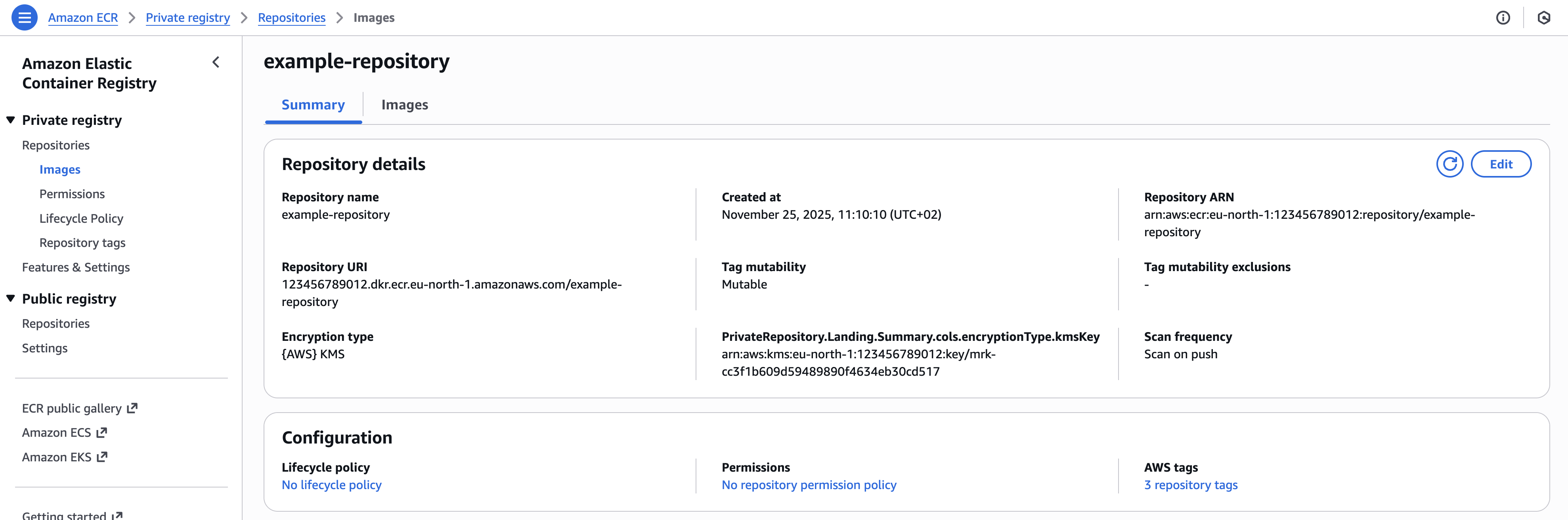
Repository Deletion
By default, Repositories are protected from deletion. spec.deletionProtection defaults to true.
To delete a Repository, first set spec.deletionProtection to false and apply the change, then delete the Repository resource. Once deletion protection is disabled, the Repository will be deleted regardless of whether it still contains images.
apiVersion: artifact.entigo.com/v1alpha1
kind: Repository
metadata:
  name: example-repository
spec:
  deletionProtection: false
kubectl delete repository example-repository
EnvironmentConfig
Some Repository defaults are not set on the Repository object itself. They are set once for the whole cluster in the platform-apis EnvironmentConfig, so every Repository gets the same behaviour without developers having to think about it.
| Setting | Default | What it does |
|---|---|---|
lifecycleRules | [] (no policy) | Automatic clean-up rules for old images, so repositories do not grow forever. |
scanOnPush | true | Scans every pushed image for known vulnerabilities. |
imageTagMutability | MUTABLE | Whether an existing tag can be overwritten by a new push. |
tags | {} | Cloud tags added to every repository. See Resource Tagging. |
lifecycleRules
The default ECR lifecycle policy for every repository. Without it, images are kept forever and storage costs grow with every build.
A Repository can replace the whole list through spec.lifecycleRules, as shown earlier in this guide. Leave the cluster-wide list empty to create no lifecycle policy at all.
Each rule takes one selector (tagPrefixes, tagPatterns or untagged) and one retention bound (keepCount or expireAfterDays). A rule without a selector matches every image and must be last.
scanOnPush
When enabled, AWS ECR scans every image pushed to the repository for known vulnerabilities and reports the findings in the AWS console. This is a good default to leave on.
imageTagMutability
Controls whether an image tag can be moved to a different image.
MUTABLE(default) — pushingmyapp:latesta second time replaces the previous image. Convenient for development.IMMUTABLE— a tag can only be pushed once. This guarantees that a deployed tag always refers to exactly the same image, which is what you want for release tags in production. Pipelines that re-push the same tag will start failing, so change this only when your build pipelines produce a unique tag per build.IMMUTABLE_WITH_EXCLUSIONandMUTABLE_WITH_EXCLUSION— the same behaviour with an exception list, configured in AWS.
Infralib Configuration Example
steps:
  ...
  - name: apps
    type: argocd-apps
    modules:
    ...
    - name: platform-apis
      source: platform-apis
      inputs:
        platform-apis:
          artifact:
            environmentConfig:
              scanOnPush: true
              imageTagMutability: MUTABLE
              lifecycleRules:
                - untagged: true
                  expireAfterDays: 7
                - keepCount: 20