Create an S3 bucket
This is an example of how to create an S3 bucket.
1. Create an S3Bucket manifest
Create an S3Bucket manifest and deploy it to the cluster. It is a good practice to include it in the application's Helm chart.
AWS IAM user with AccessKey, role, policy and Kubernetes ServiceAccount with IRSA are automatically created and configured by the S3Bucket composition.
Applications can use IAM AccessKey or IRSA to access the bucket
# Example S3Bucket manifest.
# This example creates an AWS IAM user and Kubernetes ServiceAccount `example-bucket`.
apiVersion: storage.entigo.com/v1alpha1
kind: S3Bucket
metadata:
  name: example-bucket
spec: {}

---
# Example S3Bucket manifest with versioning enabled and custom ServiceAccount name.
# This example creates an AWS IAM user and a Kubernetes ServiceAccount `example-app-sa`.
apiVersion: storage.entigo.com/v1alpha1
kind: S3Bucket
metadata:
  name: example-bucket
spec:
  enableVersioning: true
  serviceAccountName: example-app-sa

---
# Example S3Bucket manifest with an existing ServiceAccount.
# This example does not create a Kubernetes ServiceAccount.
# Required IAM permissions will be granted to an existing ServiceAccount `example-app-sa`.
# The existing ServiceAccount must exist in the same namespace with the S3Bucket.
# ServiceAccount annotation must be added manually: `eks.amazonaws.com/role-arn: arn:aws:iam::<aws-account-number>:role/<.metadata.name>`.
apiVersion: storage.entigo.com/v1alpha1
kind: S3Bucket
metadata:
  name: example-bucket
spec:
  createServiceAccount: false
  serviceAccountName: example-app-sa
---
# This service account must already exist and is not created by the S3Bucket composition.
apiVersion: v1
kind: ServiceAccount
metadata:
  annotations:
    eks.amazonaws.com/role-arn: arn:aws:iam::123456789012:role/example-bucket # This annotation must be added manually.
  name: example-app-sa
2. Mount S3Bucket credentials to a container
IAM credentials and bucket information are stored in a Kubernetes secret and AWS Secrets Manager secret <S3Bucket-name>-credentials
For more information about Secrets in Kubernetes, see Kubernetes documentation.
# Example 1 - Use IRSA to access the bucket
apiVersion: v1
kind: Pod
metadata:
  name: aws-cli
spec:
  serviceAccountName: example-bucket
  containers:
    - name: aws-cli
      image: amazon/aws-cli:latest
      command: ['sleep', 'infinity']

---
# Example 2 - Use IAM AccessKey to access the bucket
apiVersion: v1
kind: Pod
metadata:
  name: aws-cli
spec:
  containers:
    - name: aws-cli
      image: amazon/aws-cli:latest
      command: ['sleep', 'infinity']
      envFrom:
        - secretRef:
            name: example-bucket-credentials

---
# Example 3 - Use IAM AccessKey to access the bucket
apiVersion: v1
kind: Pod
metadata:
  name: aws-cli
spec:
  containers:
    - name: aws-cli
      image: amazon/aws-cli:latest
      command: ['sleep', 'infinity']
      env:
        - name: AWS_ACCESS_KEY_ID
          valueFrom:
            secretKeyRef:
              name: example-bucket-credentials
              key: AWS_ACCESS_KEY_ID
        - name: AWS_SECRET_ACCESS_KEY
          valueFrom:
            secretKeyRef:
              name: example-bucket-credentials
              key: AWS_SECRET_ACCESS_KEY
        - name: BUCKET_REGION
          valueFrom:
            secretKeyRef:
              name: example-bucket-credentials
              key: BUCKET_REGION
        - name: BUCKET_NAME
          valueFrom:
            secretKeyRef:
              name: example-bucket-credentials
              key: BUCKET_NAME
        - name: BUCKET_ARN
          valueFrom:
            secretKeyRef:
              name: example-bucket-credentials
              key: BUCKET_ARN

---
# Example 4
apiVersion: v1
kind: Pod
metadata:
  name: aws-cli
spec:
  containers:
    - name: aws-cli
      image: amazon/aws-cli:latest
      command: ['sleep', 'infinity']
      ports:
        - containerPort: 80
      volumeMounts:
        - name: credentials
          mountPath: /etc/credentials
          readOnly: true
  volumes:
    - name: credentials
      secret:
        secretName: example-bucket-credentials
        items:
          - key: credentials.json
            path: credentials.json
3. Result
3.1 S3Bucket
S3Bucket created in Kubernetes
$ kubectl get s3bucket
NAME                 SYNCED   READY   COMPOSITION                    AGE
example-bucket       True     True    s3buckets.storage.entigo.com   1h27m
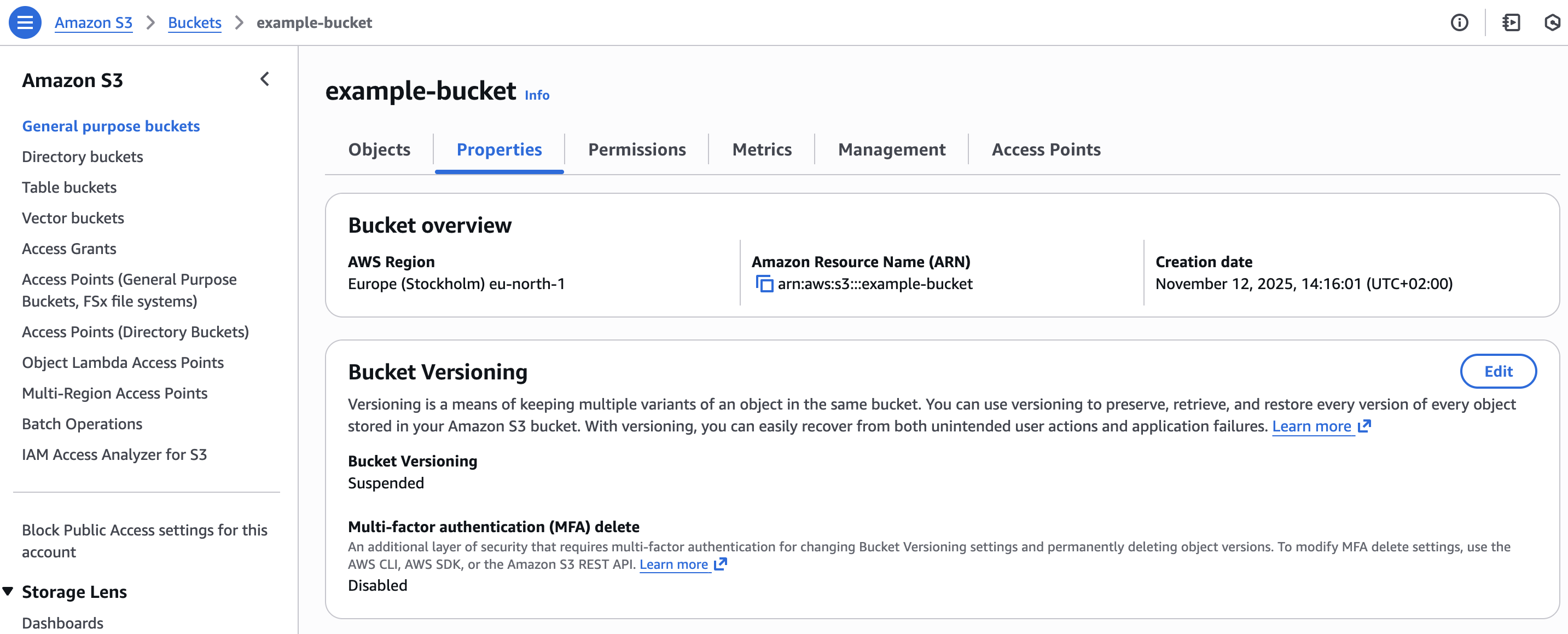
S3 bucket created in AWS
3.2 Secrets with IAM credentials and bucket information
Kubernetes secret with IAM credentials and bucket information
$ kubectl get secret
NAME                             TYPE                                DATA   AGE
example-bucket-credentials       Opaque                              6      1h20m
$ kubectl get secret example-bucket-credentials -o yaml
apiVersion: v1
kind: Secret
metadata:
  annotations:
    crossplane.io/composition-resource-name: credentials
  labels:
    crossplane.io/composite: example-bucket
  name: example-bucket-credentials
  namespace: <namespace>
type: Opaque
data:
  AWS_ACCESS_KEY_ID: <base64-encoded-access-key>
  AWS_SECRET_ACCESS_KEY: <base64-encoded-secret-access-key>
  BUCKET_ARN: <base64-encoded-bucket-arn>
  BUCKET_NAME: <base64-encoded-bucket-name>
  BUCKET_REGION: <base64-encoded-bucket-region>
  credentials.json: <base64-encoded-credentials>
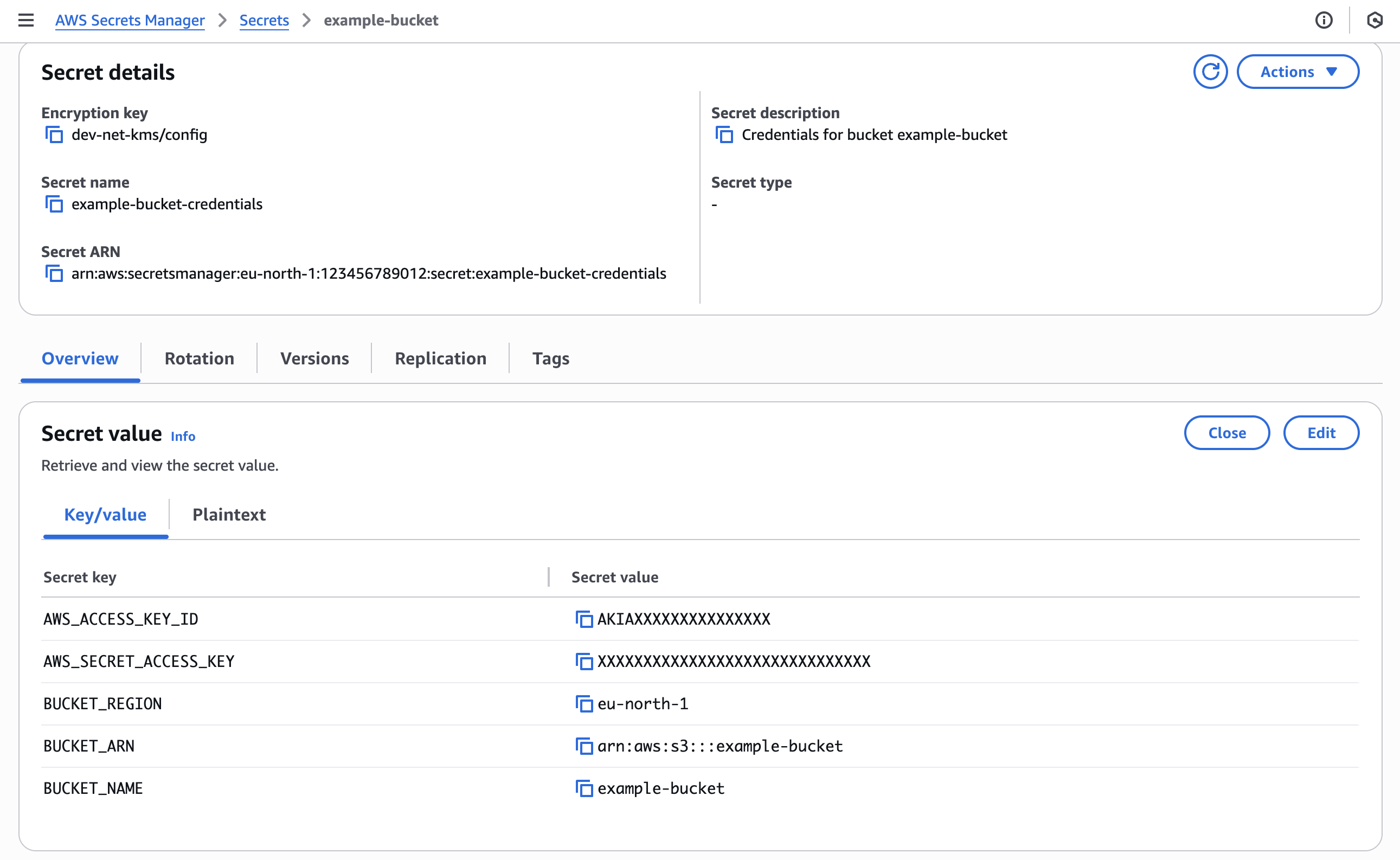
AWS Secrets Manager secret with IAM credentials and bucket information
3.3 Access bucket with ServiceAccount and IRSA
# Example 1
$ kubectl get pod
NAME      READY   STATUS    RESTARTS   AGE
aws-cli   1/1     Running   0          3s

$ kubectl exec -it aws-cli -- sh
/ touch file.txt

/ aws s3 cp file.txt s3://example-bucket/
upload: ./file.txt to s3://example-bucket/file.txt

/ aws s3 ls s3://example-bucket/
2025-12-03 08:42:06          0 file.txt

/ aws s3 cp s3://example-bucket/file.txt downloaded-file.txt
download: s3://example-bucket/file.txt to ./downloaded-file.txt
3.4 Access bucket with Secrets mounted to a container
# Example 2 and Example 3
$ kubectl get pod
NAME      READY   STATUS    RESTARTS   AGE
aws-cli   1/1     Running   0          3s

$ kubectl exec -it aws-cli -- sh
/ env
AWS_ACCESS_KEY_ID=AKIAXXXXXXXXXXXXXXX
AWS_SECRET_ACCESS_KEY=XXXXXXXXXXXXXXXXXXXXXXXXXXXXXXXXXX
BUCKET_ARN=arn:aws:s3:::example-bucket
BUCKET_NAME=example-bucket
BUCKET_REGION=eu-north-1

/ aws s3 cp file.txt s3://example-bucket/
upload: ./file.txt to s3://example-bucket/file.txt

/ aws s3 ls s3://example-bucket/
2025-12-03 08:42:06          0 file.txt

/ aws s3 cp s3://example-bucket/file.txt downloaded-file.txt
download: s3://example-bucket/file.txt to ./downloaded-file.txt
# Example 4
$ cat /etc/credentials/credentials.json
{"AWS_ACCESS_KEY_ID": "AKIAXXXXXXXXXXXXXXX", "AWS_SECRET_ACCESS_KEY": "XXXXXXXXXXXXXXXXXXXXXXXXXXXXXXXXXX", "BUCKET_REGION": "eu-north-1", "BUCKET_ARN": "arn:aws:s3:::example-bucket", "BUCKET_NAME": "example-bucket"}
EnvironmentConfig
There are no S3-specific defaults for developers to worry about. The one cluster-wide setting that affects buckets is tagging.
| Setting | Default | What it does |
|---|---|---|
tags | {} | Cloud tags added to every bucket and its IAM resources. See Resource Tagging. |
Infralib Configuration Example
steps:
  ...
  - name: apps
    type: argocd-apps
    modules:
    ...
    - name: platform-apis
      source: platform-apis
      inputs:
        platform-apis:
          storage:
            environmentConfig:
              tags:
                cost-center: CC-12345