Workspace
A Workspace is where your applications run. It provides an isolated, independent data plane instance for your workloads, built on cloud-provider native constructs — a dedicated account, VPC, IAM, and Kubernetes cluster — to enforce strong isolation from other workspaces at the cloud provider level.
What's Inside a Workspace
Workspaces are designed to be self-contained, with minimal external dependencies. Each one includes every component needed to keep operating and self-heal even when external services are temporarily unavailable:
- AWS Account and IAM — Provides strong isolation for resources and access management. All roles and privileges are defined within the workspace and cannot span multiple workspaces, even in the event of configuration errors.
- AWS CodeBuild — Runs workspace deployment and configuration tasks, enabling workspaces to operate independently without the central Organization and recover from issues when organization tools are unavailable.
- Networking infrastructure — Each workspace has a dedicated local DNS zone, Certificate Manager for secure TLS certificate management, and Application Load Balancers to expose applications to internal and external users.
- Internet and corporate connectivity — Depending on configuration, workspaces may have a dedicated NAT Gateway for internet access or connect to the corporate network through Transit Gateway.
- EKS Kubernetes cluster — Provides a workspace-local control plane that manages infrastructure and orchestrates resource provisioning.
- ECR container registry — Maintains a local copy of all container images used by the workspace. Storing your application images in the same registry ensures deployment resilience even when central build and artifact storage solutions are down.
- Platform tooling — Each workspace includes a dedicated deployment of tools that enable Kubernetes-based APIs to integrate with AWS APIs. These tools are deployed to a dedicated Zone and node pool.
Workspace in practice
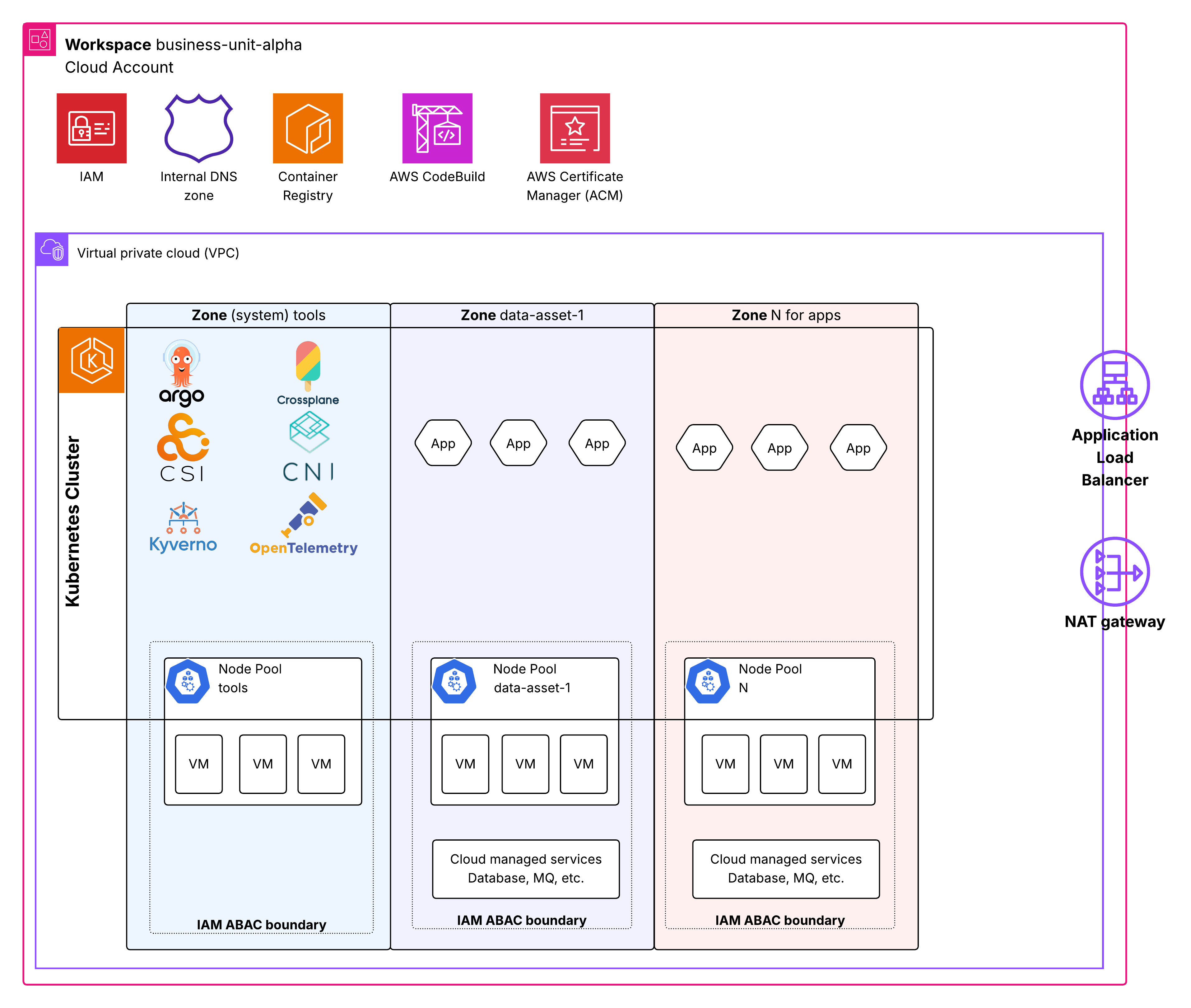
The diagram below shows one workspace (business-unit-alpha) as a single cloud account and VPC, with a Kubernetes cluster split into zones:
- Account-level services (IAM, internal DNS, container registry, CodeBuild, ACM) belong to the whole workspace.
- The system tools zone runs the platform components (ArgoCD, Crossplane, CSI, CNI, Kyverno, OpenTelemetry) on its own node pool.
- Application zones (data-asset-1, N) each get their own apps, node pool with VMs, and cloud managed services (database, MQ), fenced inside an IAM ABAC boundary.
- Shared edge — an Application Load Balancer and NAT Gateway sit at the VPC boundary for ingress and internet access.
The Cost of Isolation
This self-contained approach is a robust foundation for high availability and strong data-confidentiality isolation, but it comes at a price. Each dedicated service adds to the workspace base rate — roughly $200–400 per month per workspace.
For teams that don't require strong isolation between all data assets and cannot justify a dedicated workspace for each asset, Zones provide logical isolation between data assets within a single workspace.